

How I Cut a 25-Minute CI to About Five
Three slow steps, and the plain reason each one was slow
This post is about something that was only slow, which is harder to get anyone to fix, including me.
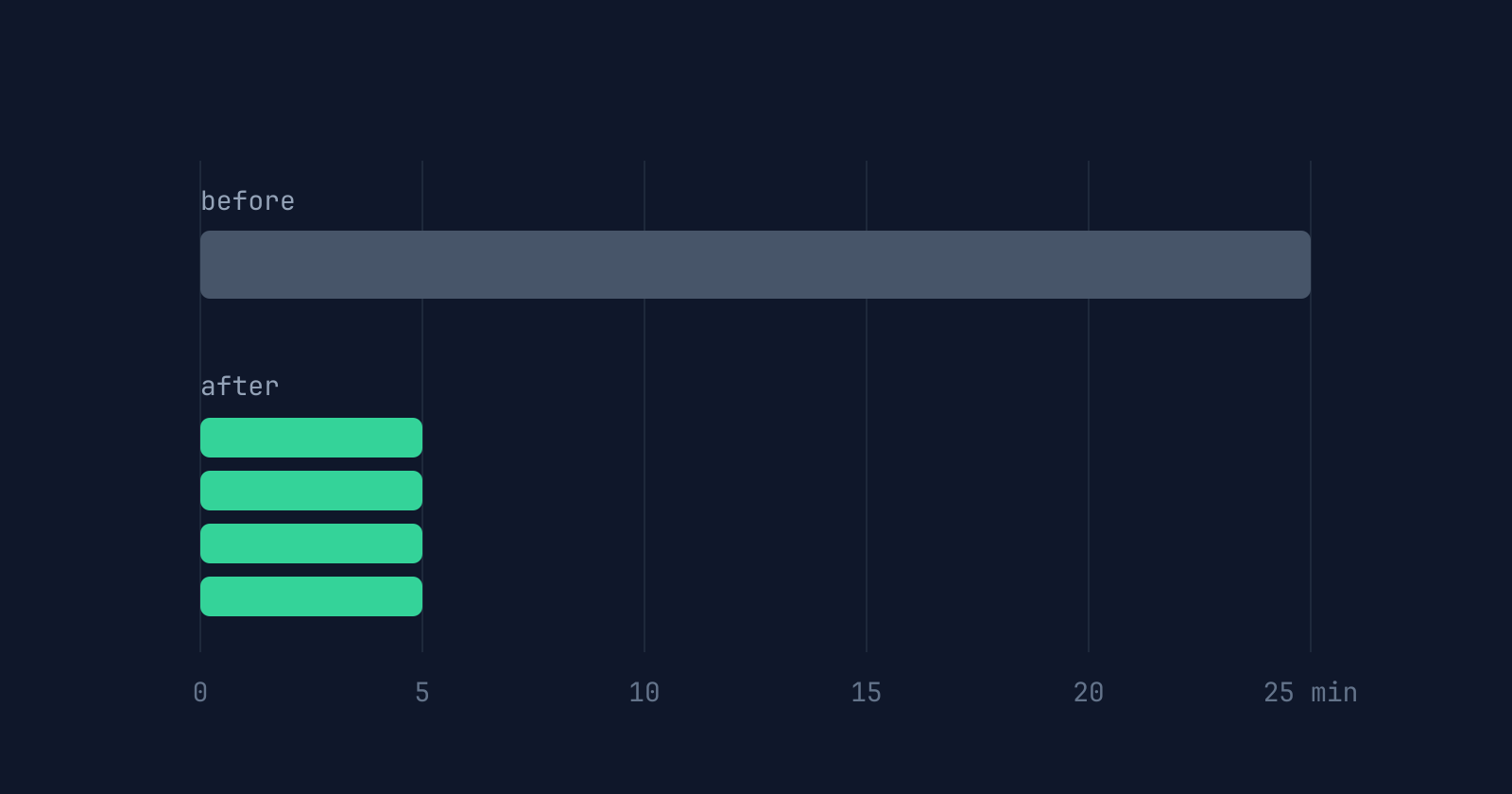
On a project I work on, every push to a pull request meant waiting about 25 minutes for CI (continuous integration, the automated checks that run before code can merge). Nobody had decided it should take that long. It crept up as the test suite grew. Deploys had the same problem, at close to twenty minutes each.
I spent a working session on it. This is where it ended up:
| Step | Before | After | What changed |
|---|---|---|---|
| Tests | about 25 minutes | about 5 | ran them in parallel, first on four cores, then on four machines |
| Image builds | about 6 minutes | under 2 | stopped packaging images nobody uses, and split the builds across two machines |
| Backup before a deploy | about 10 minutes | about 4 and a half | changed the compression tool |
None of these fixes is clever. In each case the real work was finding out what the time was being spent on. The rest of this post is how that went, including the parts that went wrong.
Start by looking
The complaint was "CI is slow and it keeps failing". Before changing anything, I went through the recent runs to see where the time went.
Almost all of it was one step: running the tests. There are about eleven thousand of them, and they ran one after another. The machine running them has four CPU cores, and the tests used one. Picture one cashier serving a long queue while the three tills beside them stay closed.
The "keeps failing" part was mostly an illusion. Most of the red runs were not failures. They were older runs being cancelled because someone had pushed a newer commit, which is what should happen. In the dashboard, a cancelled run and a failed run look the same. So the tests weren't unreliable. They were just slow.
Four cores, then four machines
The first fix was to open the other tills. pytest-xdist is a plugin for pytest, the test runner, that spreads the tests across every core instead of using one. Turning it on is one line of configuration:
[tool.pytest.ini_options]
addopts = "-n auto"
The test step went from about 25 minutes to about 15. That was better, but there were no cores left on that machine to use.
So the next step was more machines. GitHub Actions, the CI service, can run several copies of a job side by side. I split the tests into four roughly equal shares and gave each share its own machine. Each share takes about five minutes, and because they all run at the same time, the whole thing takes about five minutes.
Splitting has one real danger: a test that ends up in nobody's share. It never runs, and everything still shows green. To guard against that, one test checks that every test lands in exactly one share, and a final job fails unless all four shares passed.
That is the whole speed-up for the tests: 25 minutes, then 15, then 5.
What broke on the way
Running tests side by side broke a few that had passed for a long time. The change wasn't wrong. Those tests had been quietly relying on running alone, in a fixed order, on a quiet machine. Three examples:
- A test that depended on when it ran. It only passed if the machine had been switched on for at least ten minutes. In the old run it sat about ten minutes into the queue, so it always passed. In the new run it came up in the first minute and failed. The fix was to give the test its own clock to control, so it no longer reads the real one.
- A test that timed itself. It expected some calls to finish within a few dozen milliseconds. That holds on an idle machine and not on a busy one. It now checks what the code decided to do, not how long it took.
- Tests that shared a database. Some of the code asks the database for a lock, so that the same job can't run twice at once. When two tests asked for that lock at the same moment, one got it and the other quietly did nothing, then failed. Each test worker now gets a database of its own.
All three were bugs in the tests, and all three were there before I started. Running in parallel only stopped hiding them.
The image builds
With the tests at five minutes, the slowest check was now the job that builds the project's container images, at about six. That job exists only to prove the images still build. Nothing uses what it produces.
Reading its log turned up two things.
First, more than a minute went on packaging up the largest image at the end, only for it to be thrown away. Docker Buildx can run every build step and skip the packaging, with --output type=cacheonly.
Second, the images were built one after another. So I built them all at once, and it barely helped. They were all fighting over the same four cores, and some steps ran several times slower than they did alone.
What worked was the same move as with the tests: a second machine. The images that mostly download and install things build together on one machine. The images that compile code build one after another on the other, because they share most of that work, so every image after the first takes a few seconds. Both jobs now finish in under two minutes.
The backup before every deploy
The last wait was the deploy itself. About half of it was a full backup of the database, taken first so there is something to go back to if the deploy goes wrong.
My first idea was to skip the backup whenever a change couldn't affect the database. I built that, and code review kept finding holes in it, five in a row. The problem was the idea itself. "Always back up" is a simple promise. "Back up unless I can prove it isn't needed" is only as good as the proof, and the proof kept having gaps. It also would have helped only a small share of deploys.
So I dropped it and asked the question I should have started with: why does the backup take ten minutes at all?
The answer was the compression. The backup was squeezed through gzip, an old tool that works on one core, and gzip was slower than the database feeding it. I tried a few alternatives on a real backup. zstd, a newer tool, compressed the same data in well under a minute where gzip needed most of ten, and the file came out smaller. The change was one line:
dump_database | gzip > backup.gz    # before
dump_database | zstd > backup.zst   # after
The backup now takes about four and a half minutes, down from about ten. What's left is the database writing the data out, which a compressor can't speed up. Every deploy gets the saving, and nothing about the safety changed: the backup is still taken every time, and still checked before the deploy continues.
What I took from it
- Find out where the time goes before fixing anything. Each of these was slow for a plain reason: one core in use out of four, work that was thrown away, a slow compressor.
- Use what you already have before adding more. The three idle cores came before the extra machines.
- Expect parallel runs to expose tests that only passed because they ran alone. Fix the tests. They were already wrong.
- When a safety step is slow, make it fast before you look for ways to skip it.
None of this needed anything exotic. It needed someone to read what the pipeline was doing with its time.
About the author
- whatever topic pulls my curiosity: distributed systems, security, blockchain, cryptography or cloud infrastructure.
Comments
Join the discussionNo comments yet. Be the first to comment.
Engineer, Not Storyteller
Real problems and real decisions from my work in cloud infrastructure, written down while they're fresh. Incidents, design reviews, and the reasoning behind the calls I made.

